
From ugly prototype to polished tool: my vibe coding process
How I built an email signature generator using Claude, ChatGPT, and Codex — without writing a single line of code myself

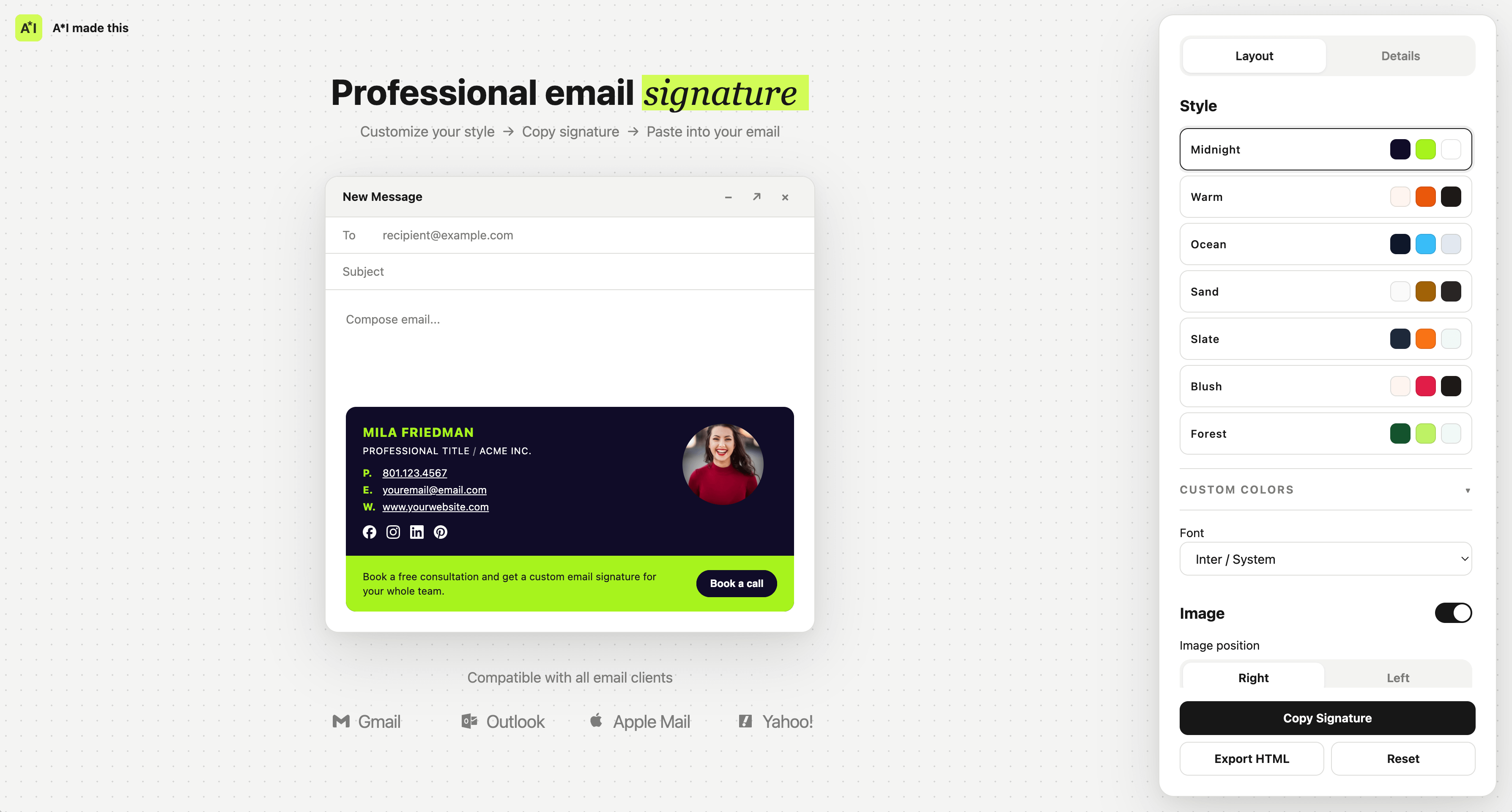
Vibe coding tools and projects is my happy place. I could literally do this for hours. I’ve built some pages before with HTML/CSS, but AI has given me new powers — all my crazy tool/product/app ideas can now go live.
Recently I built an email signature generator. If you’re a professional or a business owner, having a branded signature matters for trust and credibility. But if you’ve ever tried to create one, you know most providers don’t make it easy.
There are third-party solutions and templates out there, but design-wise most of them look clunky. So as a designer my next thought was obviously — why don’t I build one?
The idea is simple — a well-designed template, basic customization, easy content editing, and a one-click way to copy it into your email provider. Clean, simple, works across providers, looks good on mobile, and doesn’t scream ‘this was vibe-coded.’
And so I started building. I’m not a technical person. I know a bit of HTML/CSS and what good design looks like, so the MVP had to be minimal. No scary words like API, database, PR, git, or terminal. Those are future-me problems.
Process:
1. Vibe code the first prototype. Quick, dirty, ugly — we’re thinking about functionality, not polishing the UI. Lovable, Replit, Claude or a similar tool — just to get something working.
2. Brainstorming. Share the prototype with Claude and/or ChatGPT (HTML, screenshot, or link), explain what I’m building, ask for feedback — what’s missing, what could be improved. During this phase I’m thinking about MVP scope and UX. It has to be simple and light. The goal is to have a working tool quickly, with fewer but better-quality features. I dismiss suggestions that are too complex or just unnecessary for the first iterration.
3. Build. Once I had the feature list, I asked Claude and/or ChatGPT to build the HTML. I can’t comment on code quality, but the UI at this stage was drastically better — and Claude was clearly superior here. So now I’ve got the meat, time to iterate and polish.
Hey, I’m Živilė 👋
I’m a product designer exploring what AI means — for how we design, work, think, and live. Every week I filter the articles worth your time.
Also keeping a growing list of AI resources and books at aimadethis.design if you want to go deeper.
4. Polishing. This is the trickiest stage and took way too much time than it should have. I maxed out the limits multiple times and kept jumping between Claude and Codex. The hard part is that even though I had a plan, it’s never perfect — I kept coming up with improvements along the way. The classic drill: add, remove, make bigger, replace, repeat.
5. UI. As a designer, I couldn’t go with default purple gradients or generic Claude UI, so this stage also took some time — mostly research on Pinterest for inspiration and shadcn/ui for structure. In general UI was mostly built with clear, specific instructions rather than vibes like “make it minimal/clean/modern” which usually give a very generic look.
6. Check-up. Once I was more or less happy with the tool, I asked both Claude and ChatGPT to review the code and functionality — clean up code, check best practices etc. Running this on both is actually really useful because they basically check each other’s mistakes. There were cases where ChatGPT couldn’t fix mobile behavior even with detailed instructions. I took the code to Claude and it fixed it immediately.
7. Testing. Since my tool is an email signature generator, I had to test how it actually works in real life — on different email providers, how it behaves when adding the signature, and how it looks on the receiver’s side. This part seems easier than it actually is because email signature is not rendered same way as regular HTML by different email providers. Broken UI, different colors, missing icons, broken layout on mobile just to name a few. The issues I found were discussed with Claude/ChatGPT again and fixed through further iterations.
Lessons learned:
Literally - just ask. You don’t have to know all the technicalities, best practices and solutions. Stuck on something? Delegate your problem to AI.
Brutally cut the scope. AI boosts the temptation to add all kind of bells&whistles, but just don’t. At least not for the V1, this will only give more problems to solve.
Use both Claude and ChatGPT. It felt like I have two colleagues, if one gets tired (aka reaches token limit), I bring the code to the other, if I don’t like the proposed solution, I go for a second opinion.
Vibe coding something to production can indeed be a single-prompt thing if you just need a memory game for your grandma. But building something decent still takes time. It’s the thinking, crafting, designing the experience. That’s the part I actually enjoy — and honestly, that part hasn’t changed with AI. The tools are new, the process is the same.
Hope this was helpful. Feel free to test and use it yourself, and let me know how it went in the comments.
I like your design a lot. Nice build!